
What Is an Input Device? A Beginner’s Guide to Different Types — Complete Beginner Guide
Computers are a major part of modern life. We use them for study, work, entertainment, communication, shopping, creative projects and much more. But have you ever wondered how a computer receives instructions from us? How does the system know what you want it to do?
The answer is simple:
Input devices
They act as a bridge between humans and computers, allowing users to send data and commands into the system so the machine can process them.
In this guide, you’ll learn:
✔ What an input device is
✔ How input devices work
✔ Different types of input devices
✔ Examples and uses
✔ Why input devices are important
✔ Where they are used in real life
Everything is explained in clear and easy language
1. What Is an Input Device? (Simple Definition)
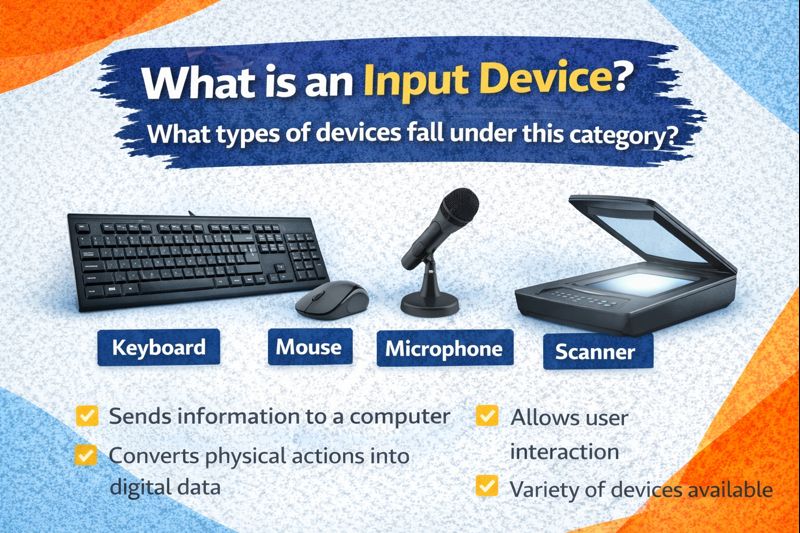
An input device is any physical computer hardware that allows a user to enter data, instructions, or control signals into a computer system.
In other words:
An input device sends information to the computer so the system can process it.
Examples include keyboards, mice, scanners, microphones, cameras, and more.
Without input devices, a computer would not be able to understand user commands — it would simply sit idle.
2. How Does an Input Device Work?
The process is simple:
1️ The user performs an action — typing, clicking, speaking, touching, scanning
2️ The input device detects the action
3️ The device converts it into machine-readable signals
4️ The signals are sent to the CPU
5️ The computer processes the information
Example:
Typing the letter A
1. The keyboard senses the key press
2. The system receives the signal
3. The letter appears on the monitor
So the device converts human actions into digital form.
3. Why Are Input Devices Important?
Input devices are essential because they:
✔ Allow communication between humans and computers
✔ Make interaction possible
✔ Help users enter text, numbers and commands
✔ Support gaming, creativity, design and data entry
✔ Enable voice instructions and smart interfaces
✔ Improve accessibility for differently-abled users
Simply put:
No input device = no way to control a computer.
4. Major Categories of Input Devices
Input devices can be grouped into different categories based on how they work.
1. Text-entry devices
2. Pointing devices
3. Scanning & imaging devices
4. Audio input devices
5. Biometric devices
6. Gaming & control devices
7. Sensor-based devices
8. Special-purpose devices
Let’s explore each group in detail.
5. Text Input Devices
These devices let you enter letters, numbers and symbols.
Keyboard
The keyboard is the most common input device in the world. It contains:
✔ Alphabet keys
✔ Number keys
✔ Function keys
✔ Shortcut keys
✔ Control keys
✔ Navigation keys
It is used for:
- Typing
- Emailing
- Data entry
- Programming
- Writing documents
Different types include wired, wireless and ergonomic keyboards.
On-Screen Keyboard
Touch devices such as smartphones, tablets and touch laptops use virtual keyboards, allowing users to type directly on the screen.
6. Pointing Devices
These devices control the cursor or pointer.
Mouse
A mouse allows users to move the pointer, click, drag and scroll.
Used for:
✔ Navigation
✔ Selecting text
✔ Editing
✔ Gaming
✔ Graphic work
Modern mice include laser, optical and wireless models.
Touchpad
Built into laptops, a touchpad detects finger movement for scrolling and clicking.
Stylus / Digital Pen
A stylus helps users interact with touch screens by writing or drawing on them.
Used by:
- Designers
- Students
- Artists
Touchscreen
A touchscreen acts both as an input and output device. Users interact by tapping or swiping directly on the screen.
Common in:
- Smartphones
- ATMs
- Retail kiosks
- Medical devices
7. Scanning & Imaging Devices
These devices capture images or physical data and convert them into digital form.
Flatbed Scanner
Used for digitising:
- Documents
- Photos
- Forms
Barcode Scanner
Reads product barcodes — widely used in stores and warehouses.
QR Code Scanner
Reads QR codes on menus, tickets, apps and websites.
Webcam
Captures live video for:
- Video calling
- Streaming
- Online classes
Digital Camera
Takes photos and videos that can be transferred to computers.
8. Audio Input Devices
These devices capture sound and voice.
Microphone
A microphone records voice or other sounds and sends them to the computer.
Used in:
- Music
- Gaming
- Online meetings
- Voice commands
Voice Assistants
Systems such as Cortana, Siri, Google Assistant and Alexa accept voice input and respond accordingly.
9. Biometric Input Devices
These devices identify users using unique physical traits.
Examples include:
✔ Fingerprint scanners
✔ Facial recognition systems
✔ Retina scanners
✔ Palm recognition devices
Widely used in security systems and authentication.
10. Gaming & Control Devices
Designed for games and simulations.
Joystick
Used mainly in simulators and gaming.
Game Controller / Gamepad
Commonly used in consoles and PC gaming.
Steering Wheel Controllers
Designed for racing simulation.
11. Sensor-Based Input Devices
These devices capture physical signals such as movement, temperature or position.
Examples include:
✔ Motion sensors
✔ Light sensors
✔ Gyroscopes
✔ GPS receivers
Often used in:
- Smartphones
- Robotics
- VR & AR systems
12. Input Devices for Accessibility
Technology should support everyone — including users with disabilities.
Examples include:
✔ Braille keyboards
✔ Eye-tracking systems
✔ Adaptive switches
✔ Speech-to-text tools
These make computing more inclusive.
13. Difference Between Input and Output Devices
| Feature | Input Device | Output Device |
| Direction | Sends data to computer | Receives data from computer |
| Purpose | Enter information | Display or produce results |
| Example | Keyboard | Monitor |
Some devices, including touchscreens, can function as both input and output devices.
14. Real-Life Uses of Input Devices
Input devices are used everywhere:
- Education — typing assignments, online exams
- Healthcare — patient data entry, digital monitoring
- Banking — ATM keypads, card readers
- Offices — data entry & reporting
- Gaming — controllers, VR sensors
- Media — recording & editing
- Retail — barcode scanners
- Transport — navigation systems
They enable communication between people and machines.
15. Advantages of Input Devices
✔ Fast data entry
✔ Simple interaction
✔ Support creativity & productivity
✔ Enable voice, touch, movement & gesture-based control
✔ Improve user experience
16. Limitations of Input Devices
Even though they are useful, they also have drawbacks:
- Wear-and-tear over time
- Errors from incorrect input
- Compatibility issues with older systems
- Cost for advanced devices
Regular care and updates help reduce issues.
17. The Future of Input Devices
Technology is moving quickly. Future devices may include:
- Brain-computer interfaces
- Gesture-only systems
- AI-enhanced voice control
- Augmented reality interaction
- Touch-free digital environments
Computers are becoming more natural to interact with — almost like communicating with another person.
18. Simple One-Line Definition
An input device is hardware that lets users send data and instructions into a computer so the system can process them.
That’s the easiest way to remember it.
19. Quick Checklist — Common Input Devices
✔ Keyboard
✔ Mouse
✔ Touchscreen
✔ Touchpad
✔ Stylus
✔ Scanner
✔ Webcam
✔ Microphone
✔ Game controller
✔ Joystick
✔ Fingerprint scanner
✔ QR code reader
✔ Graphics tablet
✔ Motion sensor
All of these fall under the category of input devices.
20. Final Summary — Key Takeaways
Here’s everything in short:
✔ Input devices allow users to enter information into computers
✔ They convert human actions into digital signals
✔ Typical examples include devices such as keyboards, mice, scanners, microphones, and cameras.
✔ They are essential for communication between humans and machines
✔ Input devices are used in every industry
✔ Future input devices will rely more on AI, gestures and natural interaction
Without input devices, computers would not be interactive or useful — they would simply process data silently without human involvement.